

Can an AMD processor keep pace with the RTX 4070 without creating a digital bottleneck?
Pairing the right silicon with this specific graphics card requires a bit of strategy so performance stays balanced.
And finding the best amd CPUs for 4070 setups comes down to matching thermal limits and core counts to your exact workflow.
Read on to see the top systems and bundles ready to handle heavy frames.
Key Takeaways
- Prioritize processors with high single-core speeds to ensure your graphics card receives data fast enough during heavy rendering.
- Look for DDR5 memory compatibility to keep your overall system architecture modern and responsive.
- Choose a bundle with an upgraded motherboard if you plan on pushing your components with manual overclocking down the road.
- Factor in the physical chassis size because high-end cooling solutions require adequate case clearance for proper airflow.
- Verify that your power supply unit provides at least an 80+ Gold rating to maintain stable voltage under load.
| Ultimate Prebuilt Powerhouse | 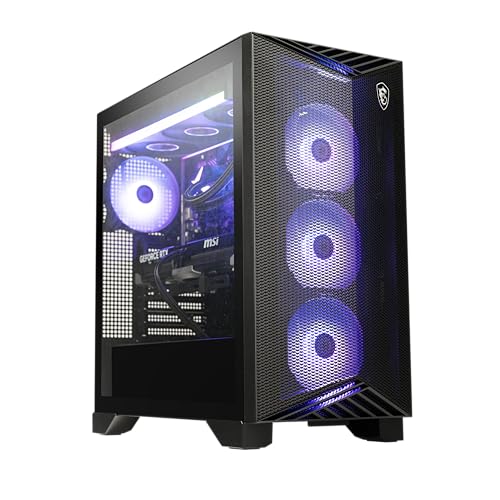 |
MSI Aegis ZS2 Ryzen 9 RTX 4070 Super | Strong twelve-core processor | Ready out of the box | Excellent thermal management | View on Amazon | Read Review |
| Best DIY Bundle |  |
Micro Center AMD 9700X B650 Bundle | Great platform foundation | Modern socket compatibility | Simplifies component matching | View on Amazon | Read Review |
| Balanced Productivity Machine |  |
Acer Nitro 60 Ryzen 9 Desktop | Massive storage capacity | Exceptional multitasking capability | Clean desktop aesthetic | View on Amazon | Read Review |
| Mobile Gaming Beast |  |
ASUS ROG Strix G17 Laptop | Stunning high refresh display | Serious portable processing power | Generous screen estate | View on Amazon | Read Review |
More Details on Our Top Picks
-
MSI Aegis ZS2 Ryzen 9 RTX 4070 Super
Finding the right match for your graphics card can feel like pairing the wrong shoes with a tuxedo. But the MSI Aegis ZS2 takes all the guesswork out of the equation by combining a high-end AMD processor with the capable RTX 4070 Super. This system suits anyone who wants a turnkey solution right out of the box without spending a weekend sourcing individual components.
You get liquid cooling right away, which keeps the twelve-core processor running quietly even during long gaming sessions. But do keep in mind that prebuilt towers leave less room for your own custom flair down the road if you love tinkering with every single cable.
- Processor:AMD Ryzen R9-7900X
- Graphics Card:GeForce RTX 4070 Super
- Memory:32GB DDR5
- Storage:2TB M.2 NVMe
- Operating System:Windows 11 Home
- Form Factor:Desktop
- Additional Feature:Liquid cooling system included
- Additional Feature:Fast WiFi 6E connectivity
- Additional Feature:Included keyboard and mouse
-
Micro Center AMD 9700X B650 Bundle
Building a rig from scratch is a bit like assembling a complex puzzle where half the pieces look identical. The Micro Center bundle solves half that puzzle instantly by pairing a fast Ryzen 7 processor with a dependable Gigabyte motherboard. This combination is ideal for builders who want a strong foundation without paying for parts they do not need.
You gain immediate access to AM5 platform longevity, meaning future upgrades will be straightforward and painless. But you will need to source your own memory, storage, and graphics card to finish the job.
- Processor:AMD 9700X
- Additional Feature:Bundled CPU and motherboard
- Additional Feature:AM5 socket support
- Additional Feature:Dual component value pack
-
Acer Nitro 60 Ryzen 9 Desktop
Tackling heavy rendering tasks alongside demanding games requires a machine that refuses to break a sweat. The Acer Nitro 60 handles multitasking like a seasoned chef managing ten orders at once thanks to its Ryzen 9 processor and ample memory. This setup is a fantastic fit for creative professionals who also demand high frame rates after hours.
The system includes a spacious 2TB solid state drive, giving you plenty of room for massive media libraries. Yet the included Wi-Fi 5 standard feels a bit dated when modern routers easily support much faster wireless speeds.
- Processor:AMD Ryzen 9 7900
- Graphics Card:NVIDIA GeForce RTX 4070 Super
- Memory:32GB DDR5
- Storage:2TB PCIe 4.0 SSD
- Operating System:Windows 11 Home
- Form Factor:Desktop
- Additional Feature:Gigabit Ethernet port included
- Additional Feature:High speed memory modules
- Additional Feature:Generous solid state storage
-
ASUS ROG Strix G17 Laptop
Staying chained to a desk is simply not an option for everyone. The ASUS ROG Strix G17 brings desktop-grade muscle into a portable chassis driven by a Ryzen 9 mobile processor. This laptop fits life on the move, especially for students or remote workers who refuse to compromise on gaming performance.
You receive a gorgeous 17.3 inch QHD display that refreshes at an ultra-smooth rate. But remember that powerful portable components generate serious heat, meaning the internal fans can get quite loud under heavy loads.
- Processor:AMD Ryzen 9 7940HX
- Graphics Card:NVIDIA GeForce RTX 4070
- Memory:16GB DDR5
- Storage:1TB PCIe Gen4 SSD
- Operating System:Windows 11
- Form Factor:Laptop
- Additional Feature:240Hz screen refresh rate
- Additional Feature:Wi-Fi 6E wireless card
- Additional Feature:Large QHD gaming display
Frequently Asked Questions
Will an older Ryzen 5600 bottleneck an RTX 4070?
At 1080p resolution, an older processor will hold back the graphics card in high frame rate scenarios. However, if you game at 1440p or 4K resolution, the GPU takes on most of the heavy lifting, and the bottleneck shrinks considerably.
Do I need to upgrade my power supply for a new AMD CPU?
Power requirements depend heavily on your total system draw, but the graphics card demands a 650 watt power supply at minimum. If you choose a high wattage processor alongside your card, stepping up to a 750 watt unit gives you safe headroom.
Is DDR5 memory mandatory for modern AMD processors?
Yes, if you purchase a modern AM5 processor, you must use DDR5 RAM because the physical pins do not fit older DDR4 memory sticks. Budget AM4 processors still support DDR4, which helps keep upgrade costs lower if you are reusing old parts.
Which AMD processor offers the best value for this graphics card?
The Ryzen 5 7600 stands out as an exceptional value choice because it delivers fast gaming performance without breaking the bank. It provides enough horsepower to run modern titles smoothly without overspending on features you might not use.
Should I buy a processor with 3D V Cache for gaming?
If your budget allows for it, processors with extra cache provide the smoothest 1 percent low frame rates in modern games. This specific feature eliminates micro stutters and keeps your gameplay feeling fluid during intense action sequences.