

Finding the right small-form-factor foundation requires balancing tiny physical dimensions with surprisingly strict power demands.
Choosing poorly leaves you wrestling with cramped cables and thermal bottlenecks.
Read on to discover the best budget mini itx motherboards for your next compact build.
Key Takeaways
- Prioritize integrated Wi-Fi if you plan on building a living room system or moving your PC frequently.
- Check the VRM phase count carefully to ensure your chosen processor receives stable power during heavy workloads.
- Match the socket type precisely to your CPU generation before clicking the purchase button.
- Measure your case clearance because oversized chipset heatsinks can easily block large graphics cards.
- Confirm the RAM generation support since jumping between DDR4 and DDR5 changes your total system cost significantly.
| Core Ultra Specialist |  |
ASRock B860I WiFi Mini ITX Motherboard | Supports Intel Core Ultra | Modern DDR5 memory slots | PCIe 5.0 ready | View on Amazon | Read Review |
| Value AM4 Foundation |  |
ASRock A520M ITX AC Motherboard | Budget friendly AM4 option | Built-in wireless connectivity | Small Mini ITX footprint | View on Amazon | Read Review |
| Mid Tier AM4 Pick | 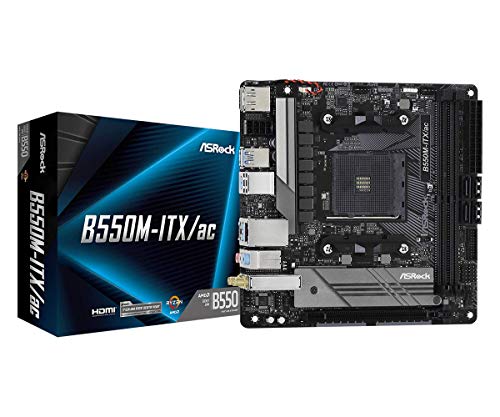 |
ASRock B550M ITX AC Motherboard | Balanced B550 feature set | Built-in WiFi and Bluetooth | Compact Mini ITX layout | View on Amazon | Read Review |
| Custom NAS Hub |  |
Mini ITX Low Power Server Motherboard | Eight SATA storage ports | Dual 2.5G LAN connections | Pre-installed low power CPU | View on Amazon | Read Review |
| Accessible AM5 Entry | 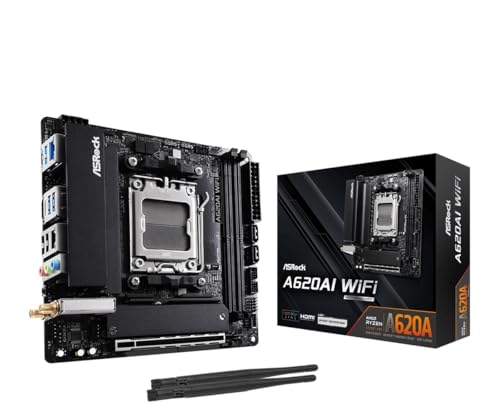 |
ASRock A620AI WiFi AM5 Motherboard | Affordable AM5 platform entry | Supports Ryzen 9000 chips | Fast DDR5 memory support | View on Amazon | Read Review |
| Balanced Gaming Platform |  |
ASRock B650I Lightning WiFi Motherboard | Strong power phase design | PCIe 5.0 M.2 support | Built-in WiFi 6E | View on Amazon | Read Review |
| Rugged TUF Build |  |
ASUS TUF Gaming B850I WiFi Motherboard | Durable TUF component build | Dual modern USB-C ports | AI Cooling II tech | View on Amazon | Read Review |
| Premium Feature Packed |  |
ASUS ROG Strix B850I Gaming Motherboard | Cutting-edge WiFi 7 networking | Robust power stage design | PCIe 5.0 x16 slot | View on Amazon | Read Review |
More Details on Our Top Picks
-
ASRock B860I WiFi Mini ITX Motherboard
Building a compact machine around Intel's newest architecture requires a reliable foundation that will not break the bank. This board steps up to support the Intel Core Ultra series on the LGA1851 socket, making it a smart pick for a potent small form factor build. You get modern DDR5 memory support and quick wireless networking right out of the box.
The inclusion of PCIe 5.0 means you can easily pair the board with top-tier graphics cards without worrying about bandwidth bottlenecks. But keep in mind that tiny Mini-ITX layouts always demand careful cable management because space is extremely limited.
- Brand:ASRock
- Socket Type:LGA1851
- Form Factor:Mini ITX
- Memory Type:DDR5
- PCIe Generation:PCIe 5.0
- Wireless Connectivity:WiFi 6E
- Additional Feature:Supports up to 128GB RAM
- Additional Feature:High speed DDR5 memory support
- Additional Feature:SATA3 6.0 Gb/s ports
-
ASRock A520M ITX AC Motherboard
Sticking with an older generation of processors remains one of the smartest ways to save money on a tight budget. This A520 option handles 3rd Gen AMD Ryzen chips smoothly while keeping the physical footprint tiny. It serves as a dependable choice for basic office rigs or casual gaming setups.
You miss out on overclocking features, but the board makes up for it with stable everyday performance and built-in wireless AC. Just remember that upgrade paths are limited since the AM4 platform is essentially finished.
- Brand:ASRock
- Socket Type:AM4
- Form Factor:Mini ITX
- Memory Type:DDR4
- Wireless Connectivity:WiFi AC
- Additional Feature:Supports 3rd Gen Ryzen
- Additional Feature:Onboard wireless capabilities
- Additional Feature:Compact form factor layout
-
ASRock B550M ITX AC Motherboard
Stepping up to a B550 chipset gives your budget AMD build a bit more room to breathe. This model brings better power delivery and expanded features compared to entry-level boards, which helps when you want stable performance during long gaming sessions. It hits a sweet spot for affordability and capability.
Wireless AC comes standard alongside reliable wired networking ports for your desktop setup. The lack of front-panel USB Type-C headers might frustrate builders using modern modern cases, so check your case compatibility first.
- Brand:ASRock
- Socket Type:AM4
- Form Factor:Mini ITX
- Memory Type:DDR4
- Wireless Connectivity:WiFi AC
- Additional Feature:Supports Ryzen processors
- Additional Feature:Integrated wireless networking
- Additional Feature:Small form factor design
-
Mini ITX Low Power Server Motherboard
Building a dedicated network-attached storage box or a home firewall requires specialized hardware that regular consumer boards simply cannot match. This integrated solution features a low power CPU paired with an impressive eight SATA ports for massive hard drive arrays. It runs quietly and keeps your electricity bill remarkably low.
Dual 2.5G LAN ports give you great routing flexibility for advanced home networking tasks. The soldered CPU means you can never upgrade the processor down the line, so you need to be sure the quad-core performance fits your exact workload.
- Brand:Generic / Unbranded
- Form Factor:Mini ITX
- Memory Type:DDR4
- Additional Feature:Dual 2.5G network ports
- Additional Feature:Supports eight SATA drives
- Additional Feature:HDMI and DP 4K output
-
ASRock A620AI WiFi AM5 Motherboard
Jumping into the AM5 ecosystem usually costs a pretty penny, but this board makes the transition much easier on your wallet. It supports current Ryzen 9000 processors while dropping expensive enthusiast features you might not actually use. The power phase design handles daily tasks and moderate gaming without breaking a sweat.
You get fast DDR5 support and WiFi 6E connectivity right out of the box. Keep in mind that the A620 chipset limits heavy overclocking, so plan to run your hardware at stock speeds.
- Brand:ASRock
- Socket Type:AM5
- Form Factor:Mini ITX
- Memory Type:DDR5
- PCIe Generation:PCIe 4.0
- Wireless Connectivity:WiFi 6E
- Additional Feature:8+2+1 Power Phase design
- Additional Feature:Dual LAN ports
- Additional Feature:Supports high speed memory
-
ASRock B650I Lightning WiFi Motherboard
Finding the right balance between cost and performance on the AM5 platform can feel tricky, but this B650 option nails the assignment. It offers robust power delivery that handles demanding Ryzen processors effortlessly inside a tiny chassis. Enthusiasts will appreciate the clean layout and sensible placement of headers.
Support for PCIe 5.0 M.2 drives ensures your storage speeds will not hold back your system. The audio solutions on budget boards can sometimes sound a bit flat, so you might want a dedicated DAC if you are an audiophile.
- Brand:ASRock
- Socket Type:AM5
- Form Factor:Mini ITX
- Memory Type:DDR5
- PCIe Generation:PCIe 5.0
- Wireless Connectivity:WiFi 6E
- Additional Feature:8+2+1 Power Phase
- Additional Feature:High speed 2.5G LAN
- Additional Feature:DDR5 overclocking support
-
ASUS TUF Gaming B850I WiFi Motherboard
Durability matters just as much as raw speed when you are squeezing high-end components into a hot, cramped case. This TUF offering brings military-grade components and reliable thermal cooling to the newer B850 chipset. It stands ready for a heavy-duty gaming rig that needs to run for hours without thermal throttling.
Dual USB-C ports give you modern connectivity options for your peripherals and external drives. The pre-mounted I/O shield makes installation much simpler, though the board carries a slightly higher price tag than basic entry-level alternatives.
- Brand:ASUS
- Socket Type:AM5
- Form Factor:Mini ITX
- Memory Type:DDR5
- PCIe Generation:PCIe 5.0
- Wireless Connectivity:WiFi 6E
- Additional Feature:AI Cooling II system
- Additional Feature:Dual M.2 storage slots
- Additional Feature:2.5Gb Ethernet port
-
ASUS ROG Strix B850I Gaming Motherboard
Pushing the boundaries of a small form factor build usually requires top-shelf hardware with clever engineering. This ROG Strix board packs advanced power stages and next-generation connectivity into a tiny footprint. It targets builders who want absolute peak performance without moving up to a larger mid-tower case.
The inclusion of WiFi 7 support keeps your wireless network blazing fast for competitive online matches. You pay a premium for the ROG branding and extra features, so your budget needs some flexibility to accommodate it.
- Brand:ASUS
- Socket Type:AM5
- Form Factor:Mini ITX
- Memory Type:DDR5
- PCIe Generation:PCIe 5.0
- Wireless Connectivity:WiFi 7
- Additional Feature:10+2+1 power stages
- Additional Feature:USB 20Gbps Type-C port
- Additional Feature:Aura Sync RGB lighting
Frequently Asked Questions
Can I use a budget mini ITX motherboard for serious gaming?
Yes, you certainly can play demanding games on an affordable board as long as your graphics card handles the heavy lifting. The motherboard mostly acts as a reliable highway for your data, so a budget model will not inherently slow down your frame rates. Just make sure your board has a reinforced PCIe slot to support heavy modern graphics cards without sagging. You should also verify that the power delivery will not overheat when your processor runs at full speed for hours.
Do I need to update the BIOS on a budget motherboard?
Many budget boards sit on warehouse shelves for months, which means they might ship with older BIOS firmware. If you pair an older board with a newer processor generation, the system might refuse to boot up until you flash the system software. Look for boards that feature a BIOS flashback button on the rear panel. This handy feature lets you update the firmware using a simple USB drive without needing a compatible older processor installed first.
Why are mini ITX boards more expensive than standard sizes?
Fitting all the necessary circuits, slots, and power delivery systems onto a tiny piece of fiberglass requires advanced engineering and miniaturization. Manufacturers charge a bit more because the production runs are smaller and the compact layout requires specialized component placement. When you find a budget mini ITX board, the manufacturer has usually saved money by using a simpler audio codec or fewer USB ports. You are paying a miniaturization tax, so expect fewer overall features compared to a larger board at the same price point.
Will my CPU cooler fit on a mini ITX motherboard? BODY: Clearance is the biggest challenge in small form factor builds, and many large tower coolers simply hang over the RAM slots or block the graphics card. You need to check the exact dimensions of your cooler against the socket distance shown in the motherboard manual. Low profile air coolers or compact all in one liquid coolers are usually the safest bet for these tiny layouts. Taking five minutes to measure everything with a ruler will save you from returning incompatible hardware.
Do budget mini ITX boards include wireless internet?
Not all budget models include built in Wi Fi and Bluetooth, so you must read the specifications list very carefully before purchasing. Some affordable boards save money by leaving out the wireless card entirely, expecting you to use an Ethernet cable instead. If you definitely need wireless connectivity, look for a model that explicitly lists an M.2 Key E slot or comes with an integrated Wi Fi module. Buying a separate wireless card later is annoying and eats up your limited budget and USB ports.