

People often assume that building a compact PC means settling for cramped layouts and meager performance. That belief is wildly outdated.
Today's tiny motherboards punch far above their weight class. Finding the best am5 itx motherboards for your desktop build simply requires knowing which features matter for cooling and power delivery.
Let us walk through the top contenders so you can build a small machine that handles heavy workloads without breaking a sweat.
Key Takeaways
- Prioritize VRM power stages rated for high current if you plan to pair your board with a top-tier processor.
- Check the PCIe slot generation carefully to ensure your graphics card gets maximum bandwidth for future upgrades.
- Measure your chassis clearances before buying because heatsink thickness can easily block large CPU coolers or tight cable routing.
- Look for integrated Wi-Fi 7 or 6E modules if you lack an accessible Ethernet drop near your desk setup.
- Verify the M.2 slot count and cooling setup so your fast NVMe drives maintain steady transfer speeds under load.
| Budget Smart Choice | 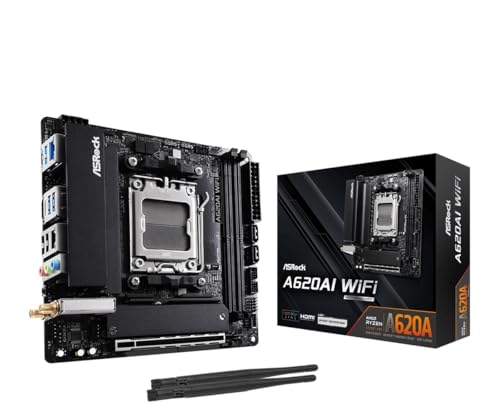 |
ASRock A620AI WiFi Mini ITX Motherboard | Budget-friendly AM5 entry | Compact mini ITX footprint | Built-in wireless connectivity | View on Amazon | Read Review |
| Ultimate Enthusiast Powerhouse |  |
ASUS ROG Strix X870-I Gaming WiFi | Advanced WiFi 7 included | Rapid PCIe 5.0 support | Premium power delivery stages | View on Amazon | Read Review |
| Balanced Performance Value |  |
ASRock B650I Lightning WiFi Motherboard | PCIe 5.0 M.2 support | Reliable power phase design | Excellent price-to-performance ratio | View on Amazon | Read Review |
| Durable Compact Workhorse |  |
ASUS TUF Gaming B850I WiFi NEO | Enhanced cooling management tools | Dual USB-C port layout | Sturdy TUF build quality | View on Amazon | Read Review |
| Connectivity Masterpiece |  |
MSI MPG B850I Edge TI WiFi | Blazing fast 5G LAN | Generous 90A power stages | Advanced Gen5 M.2 support | View on Amazon | Read Review |
| Modern Feature Favorite |  |
ASUS ROG Strix B850-I Gaming WiFi | Next-gen WiFi 7 readiness | Intelligent overclocking software | Dual M.2 storage slots | View on Amazon | Read Review |
More Details on Our Top Picks
-
ASRock A620AI WiFi Mini ITX Motherboard
Building a compact small form factor system on a strict budget can feel like solving a frustrating puzzle, but this motherboard makes the process straightforward. It suits builders who want a solid foundation for Ryzen processors without paying for high-end overclocking features they will never use.
You get an 8+2+1 power phase design that handles everyday gaming workloads reliably, alongside modern wireless connectivity.
The main compromise here is the entry-level chipset, which limits heavy CPU tuning and advanced memory speeds compared to more expensive alternatives.
- Chipset:AMD A620
- Power Phases:8+2+1 Power Phase
- Wireless:WiFi 6E
- Additional Feature:Dual LAN ports for flexible networking
- Additional Feature:Supports DDR5 memory overclocking up to 8200+
- Additional Feature:Compatible with Ryzen 9000, 8000, and 7000 series
-
ASUS ROG Strix X870-I Gaming WiFi
When absolute performance and top-tier features are the main goals for a compact build, this flagship option delivers. It appeals directly to enthusiasts who demand cutting-edge connectivity like WiFi 7 and USB4 ports without making compromises on raw power delivery.
The 10+2+1 power stages supply exceptionally clean electricity to demanding processors during extended gaming sessions or heavy workloads.
The primary drawback is the substantial financial investment required, as you pay a heavy premium for top-tier platform features.
- Chipset:AMD X870
- Power Phases:10+2+1 power stages
- Wireless:WiFi 7
- Expansion Slot:PCIe 5.0
- M.2 Slots:2 M.2 slots
- Additional Feature:Dynamic OC Switcher for automated performance
- Additional Feature:Q-Release Slim for easy graphics card removal
- Additional Feature:Dual USB4 ports for fast data transfer
-
ASRock B650I Lightning WiFi Motherboard
Finding the sweet spot between cost and capability is rarely easy in small form factor building, but this mid-range board strikes that balance nicely. It fits right into systems built for sensible performance, giving you PCIe 5.0 storage support without breaking the bank.
The robust power delivery system keeps modern multicore processors stable during intense rendering tasks or gaming marathons.
You do miss out on the absolute newest wireless standards, though the included connectivity handles standard home networks reliably.
- Chipset:AMD B650
- Power Phases:8+2+1 Power Phase
- Wireless:WiFi 6E
- M.2 Slots:PCIe 5.0 M.2
- Additional Feature:2.5G LAN for wired stability
- Additional Feature:Supports fast DDR5 memory overclocking
- Additional Feature:Pre-mounted I/O shield for easy installation
-
ASUS TUF Gaming B850I WiFi NEO
Reliability takes center stage with this rugged board, making it a great match for builders who prioritize longevity above all else. It serves users who want a no-nonsense design that can withstand long hours of heavy computing without thermal throttling or stability hiccups.
The AI Cooling II technology automatically adjusts fan speeds based on real-time system temperatures to keep noise levels manageable.
The visual style leans heavily into industrial aesthetics, which might clash if you prefer a cleaner, minimalist desktop setup.
- Chipset:AMD B850
- Wireless:WiFi 6E
- Expansion Slot:PCIe 5.0
- M.2 Slots:2 M.2 slots
- Additional Feature:DIMM Fit memory optimization utility
- Additional Feature:Pre-mounted I/O shield simplifies setup
- Additional Feature:2.5Gb LAN for fast wired networking
-
MSI MPG B850I Edge TI WiFi
Managing data transfers and network traffic in a cramped chassis requires exceptional hardware, and this board handles that challenge with ease. It targets users who need ultra-fast networking options like 5G LAN alongside modern wireless protocols for seamless cloud syncing.
The impressive 90A SPS VRM design delivers stable power to high-end processors while keeping operating temperatures impressively low.
The silver and white aesthetic limits your color coordination choices if you build inside a dark or tinted case.
- Chipset:AMD B850
- Power Phases:90A SPS VRM
- Wireless:Wi-Fi 7
- Expansion Slot:PCIe 5.0 x16
- M.2 Slots:M.2 Gen5
- Additional Feature:Memory Boost for stable high-speed RAM
- Additional Feature:Supports rapid DDR5 memory overclocking
- Additional Feature:Premium thermal heatsinks for storage drives
-
ASUS ROG Strix B850-I Gaming WiFi
Striking a middle ground between flagship extravagance and practical features, this option satisfies demanding gamers who want modern connectivity. It works wonderfully for builders looking to pair a mid-range chipset with premium networking extras like WiFi 7.
The integrated AI Overclocking tools take the guesswork out of extracting extra performance from your compatible processor.
The price point sits higher than basic B-series alternatives, requiring a careful look at your actual feature needs.
- Chipset:AMD B850
- Power Phases:10+2+1 Stages
- Wireless:WiFi 7
- Expansion Slot:PCIe 5.0 x16
- M.2 Slots:2 M.2 slots
- Additional Feature:Aura Sync RGB lighting headers
- Additional Feature:Fast 2.5G LAN port
- Additional Feature:Convenient USB 20Gbps Type-C connectivity
Frequently Asked Questions
Do I need a special power supply for an AM5 ITX motherboard?
You do not need a proprietary power supply, but you almost certainly need an SFX or SFX-L format unit rather than a standard ATX power supply. These smaller units provide the exact same standard 24-pin and 8-pin connectors, but they fit into the cramped basements of small form factor cases without blocking your cables.
Can I use older DDR4 memory with these motherboards?
The AM5 platform uses an entirely new pin layout that exclusively supports DDR5 memory modules, meaning your old DDR4 sticks will physically not fit into the slots. Upgrading requires purchasing a fresh memory kit, which fortunately has dropped significantly in price since the platform first launched.
Are ITX motherboards good for overclocking?
While high-end models feature robust power delivery systems that can handle aggressive processor tuning, the thermal limits of a small case usually stop you from pushing hardware too far. You get much better results by focusing on undervolting techniques that lower operating temperatures while maintaining peak clock speeds.
How many storage drives can I attach to a Mini-ITX board?
Space limitations generally restrict these boards to two M.2 slots for solid-state drives, with some models placing one slot on the back of the circuit board where airflow is minimal. If you need massive storage arrays, you will have to rely on network-attached storage or external enclosures rather than stacking multiple internal hard drives.
Do I need to update the BIOS before installing my processor?
Most boards manufactured recently ship with firmware that supports current processors out of the box, but older stock might require a BIOS update to recognize newer silicon. Fortunately, many quality boards feature a BIOS flashback button that lets you update the firmware using a simple USB thumb drive without needing a working processor installed.