

People assume you need to spend a small fortune on a motherboard to build a high-performance system. But that is simply not true anymore.
Smart shoppers know that finding the best budget b550 motherboards is all about spotting the sweet spot where modern features meet sensible pricing.
You can build a remarkably fast machine without spending rent money on your core logic board. Let us examine what makes these particular boards worth your hard-earned cash.
Key Takeaways
- Prioritize a board with robust VRM cooling to ensure stable power delivery during long computing sessions.
- Check the rear I/O panel carefully to make sure you get enough USB ports for all your peripherals.
- Look for built-in WiFi 6 if you want fast wireless networking without buying a separate expansion card.
- Confirm the PCIe slot generation to guarantee your graphics card and storage drives run at maximum speed.
- Choose a model with BIOS Flashback capability so you can update your firmware easily without needing an older CPU.
| Best Overall Value |  |
Gigabyte B550 Eagle WiFi6 Motherboard | Built-in Wi-Fi 6 | PCIe 4.0 support | Dual M.2 slots | View on Amazon | Read Review |
| Premium Performance Pick |  |
Asus ROG Strix B550-F Gaming WiFi II | Wi-Fi 6E included | 2.5Gb Ethernet port | BIOS Flashback button | View on Amazon | Read Review |
| Smart Minimalist Choice |  |
Gigabyte B550 Gaming X V2 | Affordable entry point | Front USB-C header | Dual M.2 storage slots | View on Amazon | Read Review |
| Rugged Daily Driver |  |
Asus TUF Gaming B550-PLUS WiFi II | Military-grade components | Integrated Wi-Fi 6 | Fast 2.5Gb LAN | View on Amazon | Read Review |
| High Memory Speed Focus |  |
ASRock B550 PG Riptide Motherboard | High memory overclock support | Low-latency mouse port | Solid SATA storage capacity | View on Amazon | Read Review |
| Fast Wireless Standard |  |
MSI B550 Gaming WiFi6E Motherboard | Wi-Fi 6E connectivity | Enhanced memory boost | M.2 Gen4 support | View on Amazon | Read Review |
| Ultra Budget Solution | 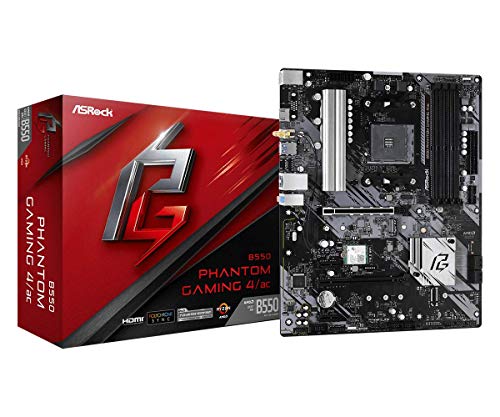 |
ASRock B550 Phantom Gaming 4 AC | Very affordable pricing | Included AC wireless | Dual M.2 slots | View on Amazon | Read Review |
| Professional Station Base |  |
ASUS Prime B550-PLUS AC-HES Motherboard | Front USB-C support | Included wireless card | Dual M.2 slots | View on Amazon | Read Review |
| Feature Rich Powerhouse |  |
Gigabyte B550 Aorus Elite AX V2 | Strong 12+2 power phase | Fast 2.5 GbE LAN | Wi-Fi 6 integration | View on Amazon | Read Review |
More Details on Our Top Picks
-
Gigabyte B550 Eagle WiFi6 Motherboard
Choosing a foundation for your AM4 processor can feel overwhelming, but this model strikes a wonderful balance between cost and capability. It suits builders who want modern connectivity without paying for enthusiast extras they will never actually use. You get a solid 10+3 power phase design that manages thermal loads efficiently during extended computing sessions.
Dual M.2 slots provide ample storage expansion for operating systems and games. The main drawback is the reliance on standard Gigabit LAN instead of faster multi-gig networking options. But for everyday work and gaming, this omission is rarely a dealbreaker.
- Brand:Gigabyte
- Socket:AM4
- Form Factor:ATX
- Memory Support:DDR4
- Wireless:Wi-Fi 6
- PCIe Version:PCIe 4.0
- Additional Feature:PCIe EZ-Latch design
- Additional Feature:RGB Fusion lighting
- Additional Feature:USB-C connectivity
-
Asus ROG Strix B550-F Gaming WiFi II
Stepping up to enthusiast territory often drains your bank account, yet this board offers high-end aesthetics and features at a more reasonable tier. It fits right into a mid-range system built for serious multi-tasking or competitive gaming. You will appreciate the robust power delivery and the inclusion of ultra-fast networking hardware.
Upgraded wireless capabilities ensure your connection remains stable during heavy network traffic. One notable limitation is the premium price tag relative to simpler B550 options. Yet the extra investment brings superior audio components and heavy-duty heatsinks.
- Brand:Asus
- Socket:AM4
- Form Factor:ATX
- Memory Support:DDR4
- Wireless:Wi-Fi 6E
- PCIe Version:PCIe 4.0
- Additional Feature:Addressable Gen 2 RGB headers
- Additional Feature:HDMI 2.1 port
- Additional Feature:Aura Sync compatibility
-
Gigabyte B550 Gaming X V2
Stripping away expensive wireless cards allows this motherboard to focus purely on core performance and structural reliability. It is a smart pick for budget-conscious builders who rely on wired ethernet and want to channel every dollar into processor or graphics card power. The 10+3 power phase handles thermal management surprisingly well under stress.
Front panel USB-C support keeps your modern case connections fully functional. The primary limitation involves the total lack of onboard Wi-Fi, meaning you must add a PCIe card if you move away from your router. But if you stay tethered via cable, you save money without losing speed.
- Brand:Gigabyte
- Socket:AM4
- Form Factor:ATX
- Memory Support:DDR4
- PCIe Version:PCIe 4.0
- Additional Feature:Q-Flash Plus button
- Additional Feature:RGB Fusion software
- Additional Feature:GbE LAN port
-
Asus TUF Gaming B550-PLUS WiFi II
Durability takes center stage here, making this board an ideal choice for rigs that see heavy, unsparing daily use. Military-grade components line the circuit board to ensure long-term stability under harsh conditions. You get enhanced power cooling alongside reliable wireless integration for hassle-free placement anywhere in your home.
The styling leans toward an industrial aesthetic that might not match every themed build. However, the comprehensive software suite lets you easily control cooling fans and lighting effects. It simply works day in and day out without fuss.
- Brand:Asus
- Socket:AM4
- Form Factor:ATX
- Memory Support:DDR4
- Wireless:Wi-Fi 6
- PCIe Version:PCIe 4.0
- Additional Feature:BIOS Flashback feature
- Additional Feature:Addressable RGB headers
- Additional Feature:Aura Sync support
-
ASRock B550 PG Riptide Motherboard
Pushing your RAM to its absolute limits requires a motherboard with capable trace routing and memory layout. This board caters to enthusiasts who love tweaking memory timings for extra performance gains. A dedicated lightning gaming port reduces mouse latency for competitive shooters.
The audio subsystem utilizes quality capacitors for clear sound during media playback. One downside is the omission of built-in wireless connectivity, which requires a separate adapter for cable-free setups. Even so, the memory overclocking headroom makes up for it.
- Brand:ASRock
- Socket:AM4
- Form Factor:ATX
- Memory Support:DDR4
- PCIe Version:PCIe 4.0
- Additional Feature:Polychrome SYNC lighting
- Additional Feature:Steel slot reinforcement
- Additional Feature:Nahimic audio integration
-
MSI B550 Gaming WiFi6E Motherboard
Connecting to uncongested wireless frequencies gives this board a distinct edge in crowded network environments. It serves gamers who demand low ping times over the air without running messy cables across the floor. You benefit from advanced memory boost technology designed to stabilize high-frequency RAM kits.
Extended heatsink designs keep the voltage regulation modules running at safe temperatures. The physical layout limits you to standard Gigabit LAN instead of faster multi-gig hardware. Yet the stellar wireless performance easily compensates for this minor gap.
- Brand:MSI
- Socket:AM4
- Form Factor:ATX
- Memory Support:DDR4
- Wireless:Wi-Fi 6E
- PCIe Version:PCIe 4.0
- Additional Feature:Core Boost technology
- Additional Feature:Steel Armor PCIe slots
- Additional Feature:Audio Boost hardware
-
ASRock B550 Phantom Gaming 4 AC
When your budget sits at the absolute floor, this motherboard keeps you afloat without sacrificing essential functionality. It suits office builds or entry-level gaming setups where every single dollar counts. You still receive PCIe 4.0 support for fast graphics cards and modern storage drives.
Included AC wireless networking lets you connect to routers right out of the box. The power delivery system is relatively basic, meaning it is best paired with mid-tier processors rather than power-hungry flagships. But for standard setups, it gets the job done reliably.
- Brand:ASRock
- Socket:AM4
- Form Factor:ATX
- Memory Support:DDR4
- Wireless:Wi-Fi 5
- PCIe Version:PCIe 4.0
- Additional Feature:Polychrome RGB headers
- Additional Feature:Reinforced steel slots
- Additional Feature:Full spike protection
-
ASUS Prime B550-PLUS AC-HES Motherboard
Striking a balance between corporate reliability and gaming capability, this board fits nicely into a multi-use home office. It appeals to professionals who require stable connectivity and straightforward expansion capabilities. You obtain dual M.2 storage slots alongside diverse rear input options.
Front USB-C headers allow for quick file transfers from modern portable drives. The wireless card relies on older Wi-Fi 5 technology rather than the newest standards. But for everyday browsing and remote work, the speed remains more than sufficient.
- Brand:Asus
- Socket:AM4
- Form Factor:ATX
- Memory Support:DDR4
- Wireless:Wi-Fi 5
- PCIe Version:PCIe 4.0
- Additional Feature:SafeSlot Core protection
- Additional Feature:Fan Xpert 2+ control
- Additional Feature:CEC Tier II ready
-
Gigabyte B550 Aorus Elite AX V2
Packing an impressive punch for the price, this board sits near the top of the mid-range hierarchy. It satisfies builders who want heavy-duty power delivery and fast networking without spending a fortune. A beefy 12+2 power phase effortlessly handles aggressive processor boosts and sustained loads.
The comprehensive heatsink coverage keeps thermal throttling at bay during intense workloads. A notable limitation is the prominent branding and gamer-centric aesthetic, which might look out of place in a professional office. But for a dedicated gaming rig, it represents exceptional value.
- Brand:Gigabyte
- Socket:AM4
- Form Factor:ATX
- Memory Support:DDR4
- Wireless:Wi-Fi 6
- PCIe Version:PCIe 4.0
- Additional Feature:Q-Flash Plus button
- Additional Feature:RGB Fusion software
- Additional Feature:Front USB-C header
Frequently Asked Questions
Can I use a Ryzen 5000 series CPU on a B550 motherboard out of the box?
Most B550 boards manufactured recently come with the correct firmware already installed. You should still check for a BIOS update label on the box if you want to avoid extra setup steps. If the board lacks the right version, you can easily use the BIOS flashback feature to update it with just a power supply and a flash drive.
Are micro-ATX budget boards worse than full-sized ATX options?
Smaller boards are not worse in terms of performance, as they usually feature the exact same power delivery and chipset capabilities as their larger siblings. They simply drop a few PCIe slots to fit into compact cases. You just miss out on expansion room for extra add-in cards. For a single graphics card and one or two drives, a micro-ATX board is the smarter buy.
Do I need a board with built-in Wi-Fi?
You only need built-in wireless if running an ethernet cable to your router is physically impossible. Motherboards with integrated Wi-Fi 6 cost a bit more, but they save you from dealing with messy USB adapters or buying a separate PCIe network card. Wired connections remain better for online gaming because they offer lower latency. Grab the Wi-Fi version only if your desk is nowhere near a wall jack.
How many M.2 storage slots do budget B550 motherboards have?
Most budget options give you two M.2 slots for solid-state drives, but only the primary slot runs at full PCIe 4.0 speeds. The secondary slot usually operates at PCIe 3.0 speeds and might share bandwidth with other PCIe slots. Read the manual carefully to see what gets disabled when you populate both slots. Mixing a fast boot drive with a slower secondary drive works great for most budgets.
Will my old DDR4 RAM work with a new B550 motherboard?
Your older DDR4 memory will work fine as long as it meets the motherboard's basic speed and voltage requirements. You just need to enable XMP in the BIOS to get the advertised speeds instead of the slow default JEDEC speed. If your RAM is slower than 3200 MHz, you might want to budget for a new memory kit later. Fast RAM makes a noticeable difference in Ryzen system responsiveness.