

Most builders assume that a monochrome PC aesthetic requires sacrificing performance for the sake of pure visual coordination. That myth stops today.
Finding the best white motherboards means balancing heavy power delivery with that pristine, light-colored PCB you want for your case.
Let us walk through the top options available right now to simplify your next build.
Key Takeaways
- Prioritize power stages that match your CPU choice to ensure stable, reliable overclocking during heavy workloads.
- Check the physical layout for M.2 slot counts and PCIe 5.0 support so your storage speeds are not bottlenecked.
- Verify the rear I/O panel includes enough USB ports and modern Wi-Fi standards for your specific peripheral setup.
- Remember that matching a white PCB with silver or white heat sinks creates a cleaner overall look than boards with random black accents.
- Balance your budget between high-end chipset features like X870 and practical everyday connectivity like 2.5G LAN.
| Premium Enthusiast Choice |  |
ASUS ROG Strix X870-A Gaming WiFi | WiFi 7 included | 16+2+2 power stages | PCIe 5.0 support | View on Amazon | Read Review |
| Ultimate Feature Flagship |  |
GIGABYTE X870E AORUS PRO ICE | 5-year warranty | Comprehensive USB4 connectivity | Clean white aesthetic | View on Amazon | Read Review |
| Balanced Midrange White |  |
ASUS B650E MAX Gaming WiFi W | True white PCB | PCIe 5.0 readiness | Reliable power design | View on Amazon | Read Review |
| Value Focused Performer | 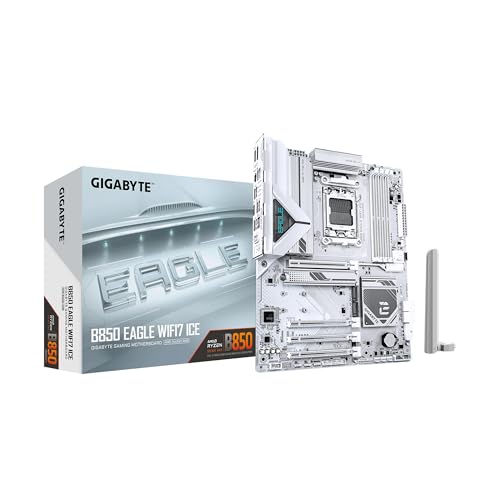 |
GIGABYTE B850 Eagle WIFI7 ICE | WiFi 7 connectivity | Competitive pricing | 3-year warranty | View on Amazon | Read Review |
| Compact Budget Champion |  |
ASRock B650M-HDV M.2 White | Micro-ATX compact size | High memory overclocking | Dual M.2 slots | View on Amazon | Read Review |
| Solid Performance Hub |  |
GIGABYTE B850 AORUS Elite WIFI7 ICE | 14+2+2 power phase | 5-year warranty | WiFi 7 included | View on Amazon | Read Review |
| Compact Powerhouse |  |
GIGABYTE B850M AORUS Elite WIFI6E ICE | 12+2+2 power phase | 5-year warranty | Compact mATX size | View on Amazon | Read Review |
| Sensible Compact Choice |  |
GIGABYTE B850M Eagle WIFI6E ICE | Affordable mATX option | 3-year warranty | Integrated WiFi 6E | View on Amazon | Read Review |
| Modern Feature Favorite |  |
ASUS ROG Strix B850-A Gaming WiFi | WiFi 7 support | 14+2+2 power stages | Four M.2 slots | View on Amazon | Read Review |
| Reliable Generation Veteran |  |
ASUS ROG Strix B650-A Gaming WiFi | Mature BIOS stability | Distinctive white styling | 2.5G LAN port | View on Amazon | Read Review |
More Details on Our Top Picks
-
ASUS ROG Strix X870-A Gaming WiFi
Finding a foundation for a high-end white build requires balancing aggressive styling with advanced hardware features. This ATX motherboard serves builders who want zero performance compromises alongside striking aesthetics.
You get 16+2+2 power stages to handle demanding workloads, alongside WiFi 7 for blazing-fast wireless speeds. And the primary drawback is simply the cost, which usually accompanies top-tier ROG branding.
- Chipset:X870
- Form Factor:ATX
- Memory Type:DDR5
- PCIe Generation:PCIe 5.0
- Networking:WiFi 7, 2.5GbE LAN
- Additional Feature:Dynamic OC Switcher
- Additional Feature:Q-Release Slim
- Additional Feature:USB4 ports
-
GIGABYTE X870E AORUS PRO ICE
Building a rig around the top-tier X870E chipset opens doors to extreme connectivity and future-proofing. This ice-white board caters to performance purists who demand maximum PCIe lanes and robust power delivery.
The inclusion of five-year warranty coverage offers immense peace of mind for an investment of this scale. But keep in mind that the feature-dense BIOS layout takes some patience to configure properly.
- Chipset:X870E
- Form Factor:ATX
- Memory Type:DDR5
- PCIe Generation:PCIe 5.0
- Networking:WiFi 7, 2.5GbE LAN
- Warranty:5 Years
- Additional Feature:EZ-Latch mechanism
- Additional Feature:Quad M.2 slots
- Additional Feature:Premium audio codecs
-
ASUS B650E MAX Gaming WiFi W
Midrange builds often suffer from mismatched PCB colors that ruin an all-white theme. This white PCB board solves that visual headache while keeping the price tag grounded.
You receive PCIe 5.0 support for next-generation graphics cards and storage drives without paying enthusiast-tier prices. And the omission of WiFi 7 might disappoint early adopters looking for the absolute latest wireless protocols.
- Chipset:AMD B650
- Form Factor:ATX
- Memory Type:DDR5
- PCIe Generation:PCIe 5.0
- Networking:Wi-Fi 6E, 2.5Gb LAN
- Additional Feature:BIOS Flashback button
- Additional Feature:Aura Sync RGB
- Additional Feature:Advanced AI PC tools
-
GIGABYTE B850 Eagle WIFI7 ICE
Upgrading to newer chipsets does not require draining your entire savings account. This B850 offering brings modern connectivity to budget-conscious builders who refuse to compromise on a white theme.
The inclusion of WiFi 7 ensures your wireless connection stays relevant for years. Yet the power phase count is noticeably leaner here, meaning extreme overclocking of flagship processors is better avoided.
- Chipset:B850
- Form Factor:ATX
- Memory Type:DDR5
- PCIe Generation:PCIe 5.0
- Networking:WiFi 7, 2.5GbE LAN
- Warranty:3 Years
- Additional Feature:EZ-Latch M.2 slots
- Additional Feature:8+2+2 power phase
- Additional Feature:USB-C front panel header
-
ASRock B650M-HDV M.2 White
Small form factor setups demand efficient layouts that do not crowd tight spaces. This micro-ATX board fits neatly into compact white chassis while supporting fast memory speeds.
Support for high-frequency DDR5 makes budget builds punch well above their weight class. But the smaller footprint restricts expansion, leaving you with fewer PCIe slots for add-in cards.
- Chipset:AMD B650
- Form Factor:Micro-ATX
- Memory Type:DDR5
- PCIe Generation:PCIe 5.0 x16
- Networking:2.5G LAN
- Additional Feature:White PCB finish
- Additional Feature:USB 3.2 Type-C
- Additional Feature:Gen5 M.2 support
-
GIGABYTE B850 AORUS Elite WIFI7 ICE
Striking a middle ground between flagship luxury and sensible spending often yields the best overall user experience. This Aorus Elite model targets gamers building an all-white system who need reliable hardware.
A robust 14+2+2 power phase design keeps high-end processors stable during long gaming sessions. And the lack of built-in power and reset buttons on the board itself makes open-bench testing slightly less convenient.
- Chipset:B850
- Form Factor:ATX
- Memory Type:DDR5
- PCIe Generation:PCIe 5.0
- Networking:WiFi 7, 2.5GbE LAN
- Warranty:5 Years
- Additional Feature:EZ-Latch technology
- Additional Feature:Triple M.2 slots
- Additional Feature:Advanced thermal guards
-
GIGABYTE B850M AORUS Elite WIFI6E ICE
Micro-ATX builders frequently struggle to find high-end white hardware that fits smaller cases. This feature-packed mATX board delivers serious muscle without the oversized dimensions.
You benefit from a 12+2+2 power phase that easily handles demanding Ryzen processors. But sticking with WiFi 6E instead of the newest wireless standard might deter future-focused network enthusiasts.
- Chipset:B850
- Form Factor:mATX
- Memory Type:DDR5
- PCIe Generation:PCIe 5.0
- Networking:WiFi 6E, 2.5GbE LAN
- Warranty:5 Years
- Additional Feature:EZ-Latch M.2
- Additional Feature:Dual M.2 slots
- Additional Feature:Premium white aesthetics
-
GIGABYTE B850M Eagle WIFI6E ICE
Building a modest gaming rig in a white micro-ATX chassis requires cost-effective core components. This Eagle series board strips away unnecessary extras to focus on reliable everyday performance.
The inclusion of WiFi 6E and a 2.5GbE port covers all modern networking bases smoothly. Yet the limited M.2 slot count means you will need to manage your storage upgrades carefully.
- Chipset:B850
- Form Factor:mATX
- Memory Type:DDR5
- PCIe Generation:PCIe 5.0
- Networking:WiFi 6E, 2.5GbE LAN
- Warranty:3 Years
- Additional Feature:EZ-Latch slots
- Additional Feature:8+2+2 power phase
- Additional Feature:USB-C connectivity
-
ASUS ROG Strix B850-A Gaming WiFi
Choosing the B850 chipset bridges the gap between affordable B-series boards and costly X-series flagships. This Strix offering provides a generous array of modern ports and striking silver-white heatsinks.
Smart utilities like AI Networking II automatically optimize your bandwidth during heavy network loads. And the pricing sits comfortably above standard entry-level boards, which might stretch some budgets.
- Chipset:B850
- Form Factor:ATX
- Memory Type:DDR5
- PCIe Generation:PCIe 5.0
- Networking:WiFi 7, 2.5G LAN
- Additional Feature:Q-Antenna design
- Additional Feature:ASUS AI Advisor
- Additional Feature:USB 20Gbps Type-C
-
ASUS ROG Strix B650-A Gaming WiFi
Proven hardware often represents the safest bet for builders avoiding early adopter software bugs. This B650 Strix board pairs a mature platform with a stark white and black color scheme.
A solid 12+2 power stage layout keeps mid-to-high tier Ryzen processors running cool and stable. But the restriction to PCIe 4.0 for storage slots means you miss out on the absolute fastest read and write speeds.
- Chipset:AMD B650
- Form Factor:ATX
- Memory Type:DDR5
- PCIe Generation:PCIe 4.0
- Networking:WiFi 6E, 2.5G LAN
- Additional Feature:Aura Sync RGB
- Additional Feature:Three M.2 slots
- Additional Feature:USB 3.2 Gen 2×2
Frequently Asked Questions
Do white motherboards cost more than black ones?
Manufacturers often charge a white tax for lighter aesthetics because painting PCBs and manufacturing white plastic components requires specialized production lines. You can usually expect to pay ten to twenty percent more for a white model compared to its black counterpart with identical specifications.
Will a white motherboard fit in a black PC case?
Physical dimensions depend entirely on the form factor, such as ATX or Micro-ATX, rather than the color. A white board will mount into a black chassis with zero issues, creating a high contrast look that many builders actually prefer.
Are white motherboards harder to keep clean?
Dust tends to show up less on white surfaces than on glossy black plastic, but grime can still accumulate in hard-to-reach crevices. Using compressed air every few months will easily keep your board looking pristine.
Can I use standard black components with a white motherboard?
Mixing colors is a common practice that breaks up the monotony of a monochromatic build. Adding black RAM sticks or graphics cards creates a striking panda theme that looks intentional and stylish.
Do all white motherboards come with integrated Wi-Fi?
Wireless connectivity varies by model and price point, so you cannot assume a feature is included just because the board is white. Always check the product specifications to confirm whether Wi-Fi and Bluetooth are built directly onto the circuit board.