

The faint smell of ozone and the steady, low-frequency hum of a heavy workstation struggling under a massive rendering queue can ruin a productive afternoon. Heavy computing tasks demand serious hardware, and finding the right foundation for an Intel Core X-Series processor requires looking closely at power delivery and thermal management.
Sifting through the available hardware helps clarify what makes the best x299 motherboards truly worth your attention. Keeping your setup stable under a full load comes down to matching the right board to your specific workflow.
Key Takeaways
- Prioritize phase power design numbers if you plan on heavy overclocking with multi-core processors.
- Check the form factor carefully to ensure the board actually fits inside your existing computer case.
- Count your available M.2 slots and SATA ports before buying to guarantee adequate storage expansion.
- Look for integrated Wi-Fi 6 if running a physical ethernet cable across the room is entirely impractical.
- Verify memory support speeds and maximum capacity limits to match your RAM requirements.
| Solid Budget Choice |  |
ASRock X299 Extreme4 ATX Motherboard | Affordable X299 entry point | Reliable ATX form factor | Standard expansion slots | View on Amazon | Read Review |
| Balanced Midrange Option |  |
ASRock X299 Steel Legend Motherboard | Dual M.2 slots | Eleven phase power | Modern USB connectivity | View on Amazon | Read Review |
| Feature Packed Powerhouse |  |
ASRock X299 Taichi CLX Motherboard | Triple M.2 storage | Ten SATA ports | Built in WiFi 6 | View on Amazon | Read Review |
| Ultimate Workstation Foundation | 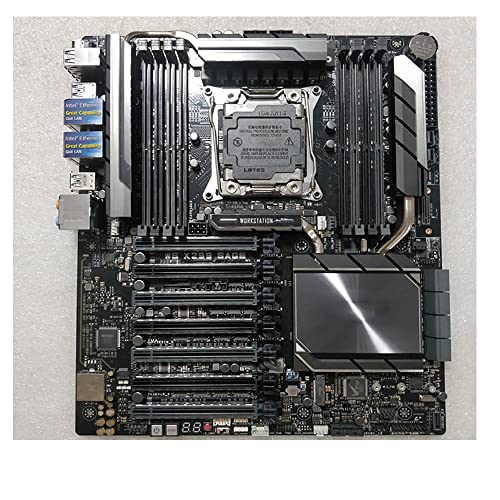 |
ASUS WS X299 SAGE Motherboard | Massive memory capacity | Multi GPU scaling | Workstation grade stability | View on Amazon | Read Review |
| Connected Creator Hub |  |
ASUS WS X299 PRO SE Motherboard | Server management features | Reliable SATA support | Professional build quality | View on Amazon | Read Review |
| Tiny Form Factor Marvel |  |
ASRock X299E ITX AC Motherboard | Miniature Mini ITX size | Integrated wireless networking | Compact powerhouse design | View on Amazon | Read Review |
More Details on Our Top Picks
-
ASRock X299 Extreme4 ATX Motherboard
If you want to step into the Intel X-Series arena without emptying your savings account, this board makes a very sensible starting point. It offers the foundational LGA2066 architecture you need for heavy multithreaded tasks, but it keeps things simple by omitting costly extras you might never actually touch.
The main strength here lies in providing core workstation capability at a fraction of the usual cost. But you should keep in mind that its feature set is relatively sparse compared to higher-end models, meaning you will miss out on ultra-fast onboard networking and elaborate power delivery designs.
- Brand:ASRock
- Socket:LGA2066
- Form Factor:ATX
- Additional Feature:Multi-GPU support
- Additional Feature:Flexible storage options
- Additional Feature:Standard audio capacitors
-
ASRock X299 Steel Legend Motherboard
Building a reliable creative rig often requires a delicate balance between price and performance, which is precisely where this board shines. You get dual M.2 slots for snappy storage alongside an 11-phase power design that keeps your processor stable during long rendering sessions.
Users who appreciate aesthetic coordination will also enjoy the built-in RGB lighting headers. On the downside, memory overclocking limits top out lower than elite tier competitors, so extreme enthusiasts might find themselves wanting a bit more headroom.
- Brand:ASRock
- Socket:LGA2066
- Form Factor:ATX
- Memory:DDR4 4200+ (OC)
- Ports:USB 3.2 Gen2x2, Dual Intel LAN
- Power Design:11 Phase Power
- Additional Feature:RGB Lighting
- Additional Feature:High speed networking
- Additional Feature:Robust cooling sinks
-
ASRock X299 Taichi CLX Motherboard
When your daily workload involves massive data transfers and heavy multitasking, this motherboard provides the necessary muscle. It stands out by offering triple M.2 slots and ten SATA ports, ensuring you never run out of room for your media libraries and scratch disks.
The addition of WiFi 6 brings modern wireless speeds to your desktop environment without requiring extra adapter cards. However, the sheer volume of integrated features and the robust 13-phase power design mean this board commands a premium price tag that casual users can easily skip.
- Brand:ASRock
- Socket:LGA2066
- Form Factor:ATX
- Memory:DDR4 4200+ (OC)
- Ports:USB 3.2 Gen2x2, 10 SATA3
- Power Design:13 Phase Power
- Additional Feature:Wireless six connectivity
- Additional Feature:Advanced power delivery
- Additional Feature:Extensive storage expansion
-
ASUS WS X299 SAGE Motherboard
Professional video editors and 3D animators will appreciate the heavy-duty engineering packed into this specialized workstation board. It supports up to 128GB of DDR4 memory and is built to handle multiple heavy graphics cards simultaneously without breaking a sweat.
The layout prioritizes raw stability and uninterrupted enterprise reliability over flashy consumer gimmicks. The main drawback is the industrial design, which lacks the vibrant lighting and visual flair that home builders often prefer.
- Brand:ASUS
- Socket:LGA2066
- Memory:128GB DDR4
- Additional Feature:Enterprise grade reliability
- Additional Feature:Extensive PCIe lane support
- Additional Feature:Enhanced thermal management
-
ASUS WS X299 PRO SE Motherboard
Managing a complex studio network requires dependable hardware, and this model delivers with its advanced remote management capabilities. The integrated Server Management port lets administrators monitor system health efficiently, making it a dream for office environments and dedicated editing suites.
You also get robust SATA 600 support for rapid data access across multiple drives. On the flip side, the lack of onboard wireless means you will need to rely on wired ethernet or a separate expansion card for internet access.
- Brand:ASUS
- Socket:LGA2066
- Form Factor:ATX
- Memory:DDR4
- Ports:S-ATA 600
- Additional Feature:Remote management integration
- Additional Feature:Professional workstation routing
- Additional Feature:Durable power components
-
ASRock X299E ITX AC Motherboard
Packing high-end workstation performance into a Mini-ITX footprint sounds like an impossible engineering puzzle, yet this tiny board makes it happen. It allows you to build a compact rendering beast that easily fits on a crowded desk or inside a travel bag.
Despite its diminutive size, it still supports 64GB of DDR4 memory and includes reliable wireless networking. The obvious compromise here is the extreme restriction on expansion, leaving you with very little room for extra add-in cards or elaborate cooling solutions.
- Brand:ASRock
- Socket:LGA2066
- Form Factor:mITX
- Memory:64GB DDR4
- Ports:USB 3.1, 2T2R
- Additional Feature:Tiny form factor
- Additional Feature:Built in wireless AC
- Additional Feature:PCIe slot for GPU
Frequently Asked Questions
Do all X299 motherboards support the 18-core Intel processors?
Not necessarily, because the highest-tier processors draw immense amounts of power and demand heavy-duty VRMs. Entry-level boards from the initial X299 launch might overheat or lack the proper power phases to run an 18-core chip stably at stock speeds. Always check the CPU support list on the manufacturer website before pairing a massive processor with a budget board.
Can I use standard DDR4 RAM from a normal desktop build?
Yes, standard desktop DDR4 memory sticks work just fine on an X299 motherboard. However, you miss out on the full performance benefits of quad-channel bandwidth unless you install matching sets of four or eight sticks. Mixing random memory kits usually leads to instability, so try to buy your RAM in a single matched kit for the best results.
Are older LGA 2011 coolers compatible with X299 motherboards?
Many older coolers physically fit the LGA 2066 socket because the mounting hole dimensions remained identical between generations. But you must verify that your cooler can handle the thermal design power of these enthusiast processors, which frequently exceed 165 watts under load. Check with your cooler manufacturer to see if you need to order a free mounting bracket upgrade for the newer socket.
Why do some M.2 slots disable my SATA ports?
Motherboards only have a finite number of PCIe lanes available from the CPU and chipset, forcing manufacturers to share bandwidth between storage options. When you install an NVMe drive in a specific M.2 slot, the board might repurpose the lanes assigned to traditional SATA ports. Reading the manual layout specifications before installation helps you avoid missing storage drives when you boot up for the first time.
Is the X299 platform still worth building on today?
The X299 platform remains a viable option for users who need massive memory capacity and lots of PCIe lanes without paying for brand-new enterprise hardware. While newer desktop platforms offer higher single-core speeds, used or discounted X299 parts provide incredible multi-threaded value for video editing and 3D rendering. Just keep in mind that this platform is effectively end-of-life, meaning your upgrade path stops with the Cascade Lake X refresh.